

Tasks & projects
Every Follow-Up
Has an Owner
Turn a call, a voicemail or a chat message into a task in one click, then track it on a shared board. Built into the desktop app on every plan, so you do not need a separate project tool.
Project boards
See Who Is Doing What, at a Glance
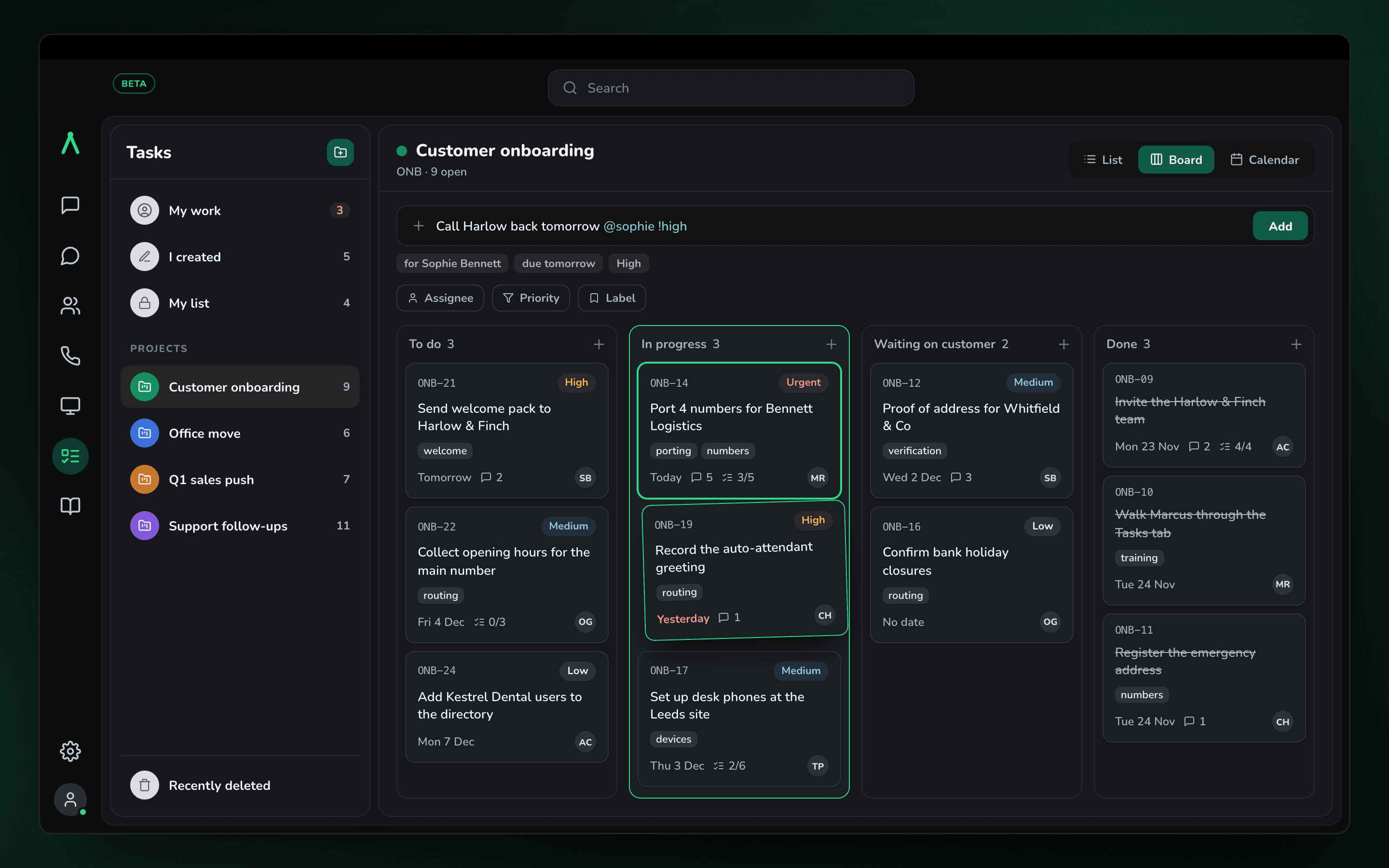
Each project has its own board. Drag a card to move it on, filter by person, priority or label, and switch to a list or calendar when you want a different view of the same work.
What you get
Simple Enough to Use,
Complete Enough to Rely On
Assignees, due dates, priorities, labels, checklists, file attachments and a full history on every task.
My work
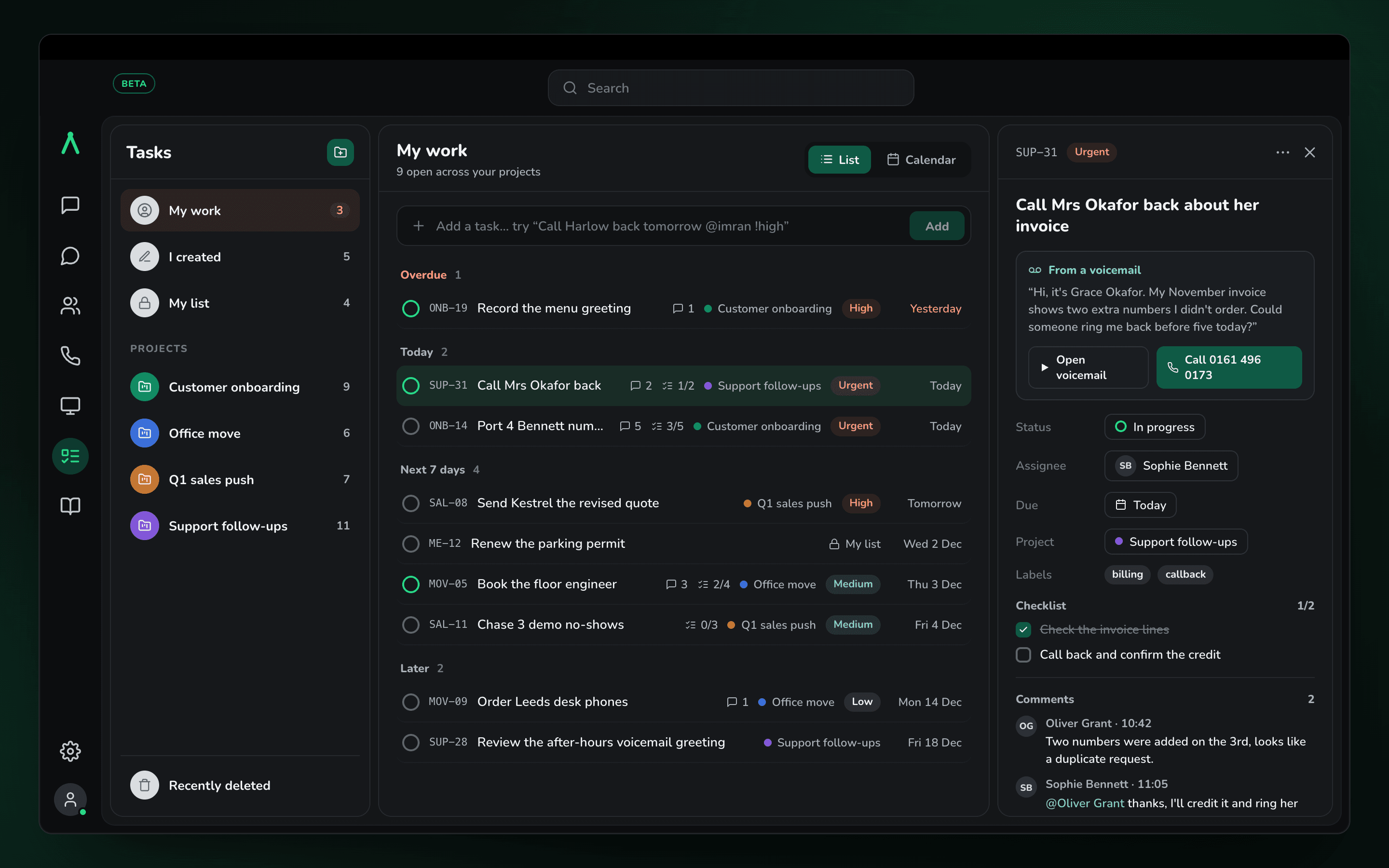
Everything assigned to you across every project, grouped into overdue, today, the next seven days and later. Tick the circle and it is done.
Project boards
One board per project with your own columns. Drag cards between them, or switch the same tasks to a list or a calendar.
Tasks from conversations
Create a task from a call, a voicemail, a chat message or a meeting recap action item. The task links back to it and can call the number back.
Quick add
Type “Call Harlow back tomorrow @sophie !high” and the assignee, due date and priority are set as you type.
Comments and reminders
Discuss a task where it lives, @mention a colleague to notify them, and get a notification when work is assigned to you or due.
Private and shared
Every person gets a private list nobody else can see. Projects can be open to the whole company, one team or chosen people.
Why it lives in your phone system
From a Missed Call
to Done
Most follow-ups start with a conversation. Because tasks sit beside your calls, voicemail and chat, the promise you made on the phone becomes a task before you have put the handset down.
- 01
A customer rings
The call or voicemail arrives
It lands in your call history or voicemail inbox as it does today, with the smart voicemail summary on every plan.
- 02
One click
It becomes a task
Choose New task on the call, voicemail or chat message. The caller's words and number are carried across, so nobody retypes them.
- 03
On the board
Someone owns it
Give it an assignee, a due date and a priority. It appears in their My work list and on the project board for the whole team.
- 04
Followed through
Call back from the task
Open the task, press Call and ring the customer back from your business number. Tick it done and the board updates for everyone.
My work
Start the Day Knowing What Is Due
One list of everything assigned to you, across every project. The badge on the Tasks tab counts what is due today or overdue.
- Grouped by overdue, today, the next seven days and later
- The voicemail or call a task came from, quoted on the task
- Checklists for the steps, comments for the discussion
- Search finds a task by its key or its title
- Works offline: changes are saved and sent when you reconnect
- Deleted by mistake? Restore it within 30 days
For managers and admins
Stay in Control Without Chasing
- An overview in the web dashboard: open, overdue, unassigned and done this week
- Workload per person, so nobody is quietly overloaded
- Choose who can create projects: admins, managers or everyone
- Set a project lead, rename and reorder the board columns
- Archive a finished project and restore it later
Included in your plan
Tasks come with every plan and every trial. There is no add-on to buy and no extra seat to pay for.
- Starter
- One shared project for the team, plus a private list for every person.
- Professional and Ultimate
- Unlimited shared projects. Ultimate also turns meeting recap action items into tasks.
Try Tasks With Your Team Free for 30 Days
Tasks are switched on during the trial. No card, no commitment.